Tanishq Rupaal
Following is a post on achieving perfect email management. All ideas and thoughts here are the way I personally implement my own email management system. There might be other methods or ideas by other productivity gurus out there which may work better depending on specific use cases. However, the following is what I find to be easy to implement and effective in results.
Email Applications
Most used email applications
The most commonly used email management applications are as follows →
- Gmail by Google
- Outlook by Microsoft
- Protonmail by Proton
- Email aggregator applications such as Spark by Readdle or BlueMail
Commonalities among email management applications
The aforementioned applications provide the following basic functionalities →
- Compose a rich text or a plain text email
- Provide CC (carbon copy) and BCC (blind carbon copy) fields for recipients
- Maintain single or multiple mailboxes as a collection of email conversations
- Send files of sizes up to 25 MB directly and those greater than 25 MB via cloud storage links (keep in mind these consume your own free quota of cloud storage)
- Provide a means for newsletters and notifications (also a big source of spam emails)
The basic feature of an email is to have an email address and a platform to communicate on. Think of it like WhatsApp or iMessage or Telegram, because it is technically just that. Those instant messaging applications are just a more user-friendly variant of email through and through.
How should you treat an email inbox
An email inbox must be treated like a list of things that are pending to look at, or a list of things that are currently ongoing such as emails that you’re waiting for a reply on.
Everything that doesn’t qualify as the above must be either deleted or archived (a formal process defined soon). That would help achieve the concept of Inbox Zero, which is aimed at maintaining a clutter-free and well-organized email inbox.
[!DANGER] DO NOT treat your inbox like a dustbin that stores everything unnecessarily. Important things must be transferred and filed away in your cloud storage. Unimportant things such as newsletters and spam must be removed
Achieving Inbox Zero
Inbox Zero requires just one thing → Regular review - this can be done at any cadence depending on the number of (worthwhile or non-spam) emails that you receive. Example → review daily if you get approximately 20 emails a day, or weekly if you get that many in a week. The regular review is not the same as incident-based review which means if you get an email notification that you need to review immediately, you take action then and ignore the other pile of unread emails which you’ll look at during your regular review.
Usually email providers have amazing search functionalities which use machine learning to provide best results, which means there is generally no need to maintain separate buckets or categories of emails using folders (labels in Gmail). If at all necessary to maintain categories, do not maintain more than 4 or 5, otherwise it may become hard to manage. Example categories can be as follows →
- Finances → Store finance related emails or conversations such as dispute logs
- Receipts → Store text receipts of important purchased goods
- Work → Store conversations or information pertaining to your primary line of work only
- (Optional) Secondary Work → Related to your other lines of work
- (optional) People → Conversations with people in everyday life (just like instant message chats)
- Archive → Store everything that you might need to refer at some point in the future
The simplest (and recommended) way to maintain an Inbox Zero state is by just keeping the main inbox and an archive. The idea is, if anything is important or needs referring back at any point in the future, it should be archived after the necessary action. This should not include documents, which need to be stored in the cloud because storing documents in email consumes unnecessary cloud space, especially in Google Drive. If it isn’t important, it must be deleted. The inbox can be used as sort of a task list of whatever is pending, however, it is ESSENTIAL that you definitely review all items during your regular review.
The following flow chart can help with a decision process →
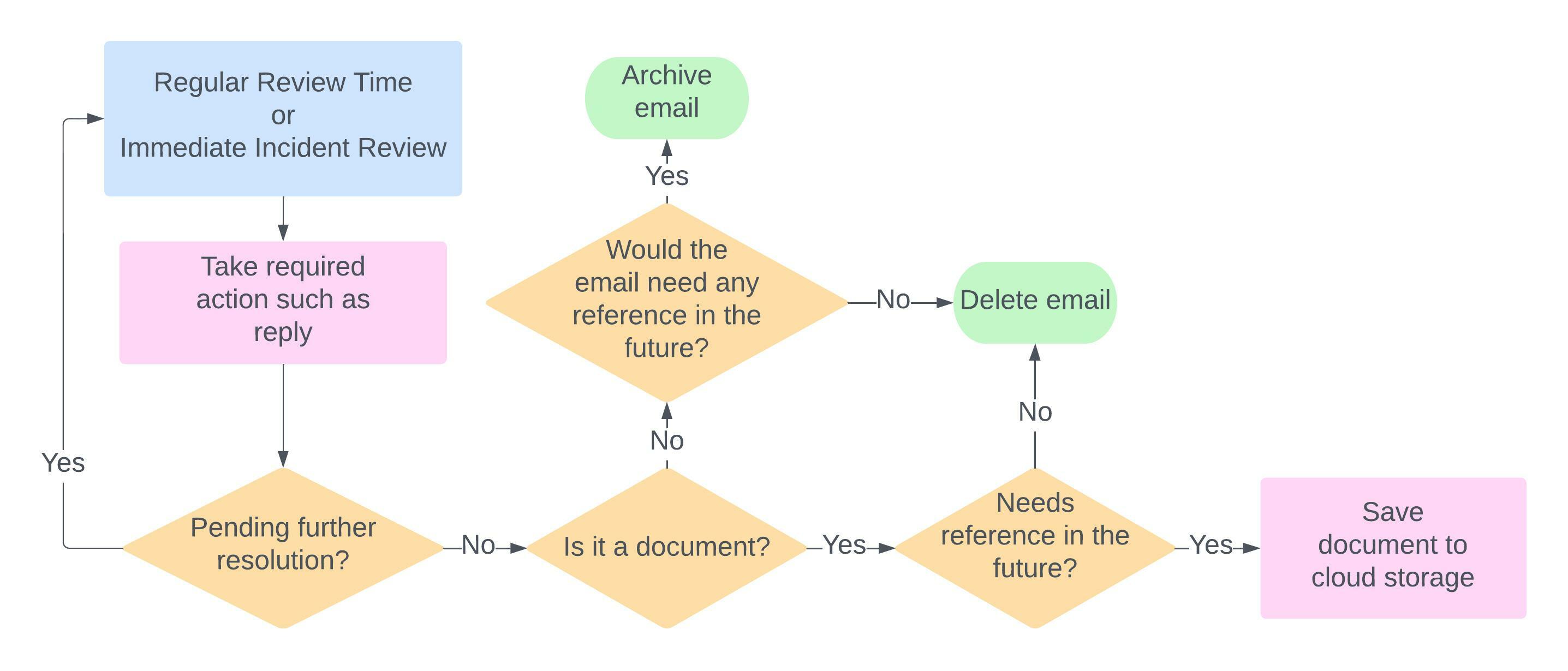
If you want to maintain the highest level of cleanliness, you could also setup a reminder to clear all archive emails older than 10 months once every quarter. But this is optional.
Bonus: Self-BCC Trick
In most email providers, when we send an email to someone, it goes into sent email. With Inbox Zero, it would not look cluttered to have that email listed in the inbox. Therefore, a simple trick to push the email to inbox is to add your own email in the BCC field, which essentially means sending an email to yourself. With this trick a sent email, especially one which you do not expect a reply to, will appear in the inbox for you to follow up on or use as a reminder for yourself during the next review cycle.