Tanishq Rupaal
[!DANGER] I updated the project to port it to Go and removed the rendering capability because it was barely being used. The UI is updated and much improved. The project is still available for x86_64 containerized execution. But it also builds binaries for all operating systems (linux, darwin, and windows) and architectures (amd64 and arm64).
This is an application I wrote to solve several of my needs that are listed throughout the text here. The idea behind this application is effectively that it acts like a local network clipboard with history and support for displaying raw text for copying. It can render markdown files in GitHub-flavored MarkDown in light and dark themes, and store files to share within the local network. All updates made by any device are immediately (within 1 second) reflected on all other devices.
Basically, it keeps text dumps, files, and links available for any device in a local network. The code lives in the repository Local Content Share.
I’ll come back to the motivation behind building this application at the end, but for now, let’s see how to use it!
Installation & Execution
I maintain an image on docker hub, which can be used directly as follows →
docker run --rm -d \
--name local_dumpster -p 5000:5000 \
-t tanq16/local_dumpster:main
[!TIP] Use “tanq16/local_dumpster:main_arm” for ARM64 images (apple silicon or raspberry pi).
To stop the container, do the following →
docker stop local_dumpster -t 0
An equivalent Docker compose template or a template to deploy using Portainer stacks is as follows →
services:
  local_dumpster:
    image: tanq16/local_dumpster:main
    container_name: local_dumpster
    ports:
      - 5000:5000
If you want to build the image yourself instead, check out the last section.
Usage
Deploy the container on a server and then visit http://<server>:5000 to use the application.
This is a Flask-based application that stores all the information entered within as files inside the container. Note that the files are inside the container and will not persist across container restarts (like an actual digital clipboard). If you need that functionality, modify the Dockerfile to comment the COPY instruction and mount the repo directory using -v while running the container. Refer to the last section to build the image yourself.
This is an example screenshot of what the UI looks like →
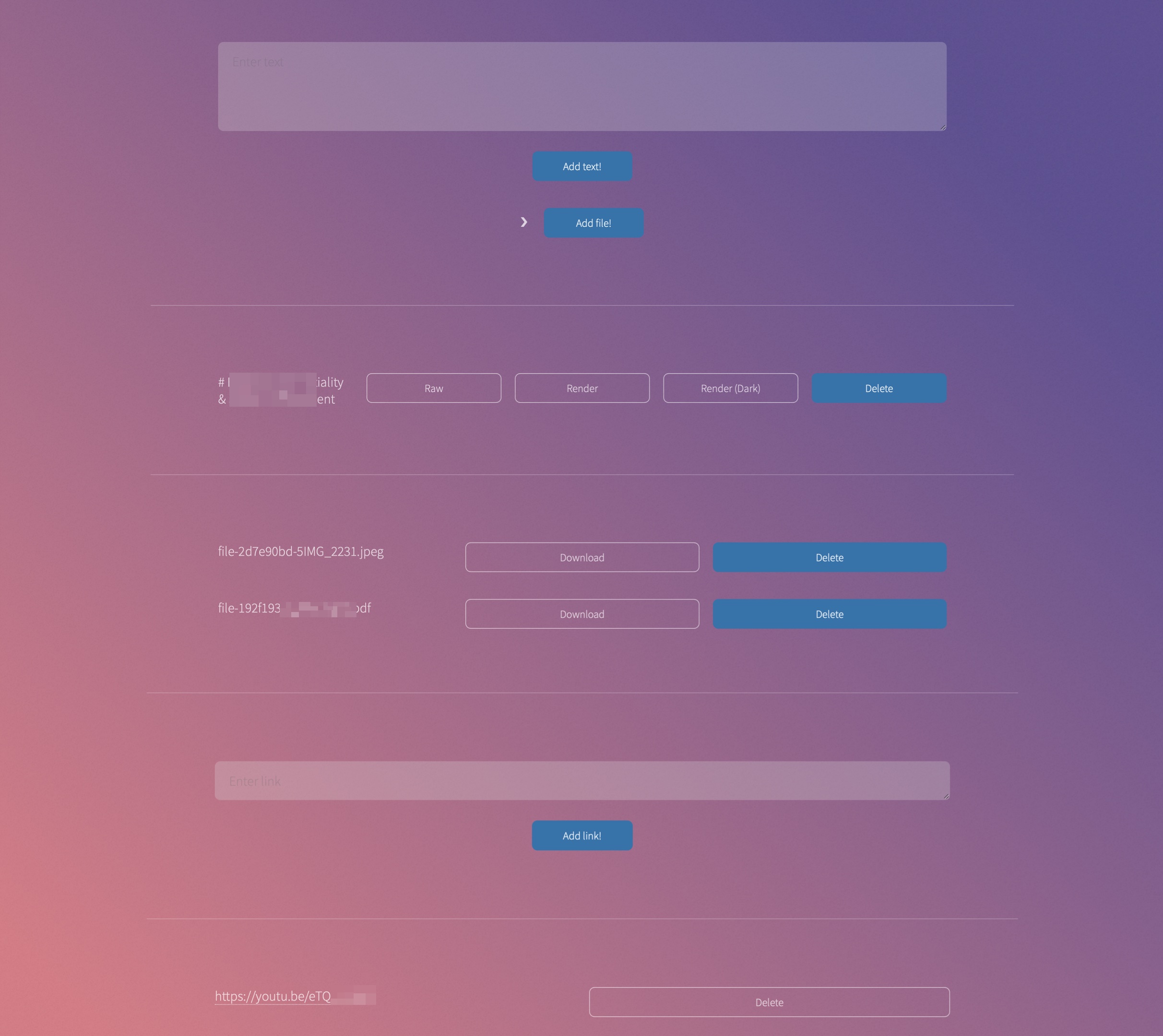
The functionalities available here are as follows →
- Text Store → The first text area on the UI is where you can paste any text and then, click the “Add text!” button to store it. The empty section below will get populated with the available list of text pastes with the first line as the name and options to view raw content, render as markdown in light and dark modes, and delete the text.
- File Store → For aesthetics, the file selection button is hidden, so click the “❯” icon beside the “Add file!” button to expand the file selection input. Then select a file with that button and click “Add file!”. Similar to Text Store, another section will get populated for files with an option to download and delete.
- Link Store → Like the other sections, there is a link paste section below, so add a link and click the “Add link!” button. The last section will get populated with all available links (clickable) and an option to delete.
- Render MarkDown → Visit
http://<server>:5000/printorhttp://<server>:5000/printto render a markdown dump in GitHub-flavored light and dark modes, respectively. This option doesn’t persist the pastes.
[!DANGER] Deleting text and files requires confirmation, while links do not.
Motivation
As noted in this blog post, the SnapDrop local variant depends on a TURN server, which isn’t the best option with respect to security. I needed a local-only service, so I modified SnapDrop to work only locally.
That works, but there are some other issues with it as well →
- Some end-user management services can deny connection to unknown servers over WebRTC
- The application only allowed single pastes and files to persist at a time
- The text always overflowed on the UI, and tabs and spaces weren’t always honored
- It depended on the clean establishment of a “room” with the participants and involved a bunch of refresh actions from time to time to get that established
Half of these issues happened because of the peer-peer nature of the application. So, I created an application with more functionality that functions primarily on the backend rather than end nodes. This application fixes all the issues mentioned above, even honoring spaces and tabs since there is an option to view raw content.
Self-Build
Use the following commands to clone the repo and enter it →
git clone https://github.com/Tanq16/local-content-share
cd local-content-share
Use the following command to build the container →
docker build -t local_dumpster .
Finally, run the container (with your port of choice on your host; default - 80) using this command →
docker run --name local_dumpster --rm -p 5000:5000 -d -t local_dumpster
When done, do the following to stop the container →
docker stop local_dumpster -t 0
The container will need to be stopped, built and run again to reflect changes to the code. Alternatively, modify the Dockerfile to provide a shell and mount the code into a volume. Then run Flask with debug mode to trigger changes automatically.
And that’s everything this application does!