Tanishq Rupaal
The World of CLI Tools
Command Line Interface (CLI) tools are essential for developers, sysadmins, and security professionals. They’re lightweight, scriptable, and often more powerful than their GUI counterparts.
Traditional CLI tools like simple Python scripts or quick Bash scripts often have limitations when it comes to displaying complex information or showing progress. Simple text output can become messy when dealing with multiple concurrent operations or when you need to present structured data like tables. Concurrent operations quickly become commonplace as we get more sophisticated with our tooling. In the current age, almost everyone is a sucker for time and wants multi-threaded operations.
The Need for a Terminal UI
For such sophisticated CLI tools, Terminal User Interfaces (TUIs) are extremely nice and useful. A well-designed TUI can:
- Show concurrent operations clearly
- Display progress indicators
- Present structured data effectively
- Provide real-time updates without cluttering the screen
- Maintain readability while offering rich information
- Significantly enhance the user experience
Overall Idea for the TUI
The TUI implementation I’ve developed focuses on managing multiple concurrent operations with clear status reporting and format princting that is applicable to a wide range of applications. My tools started to get more sophisticated as I picked up Go for my day to day activities and Go encourages the use of goroutines, making a TUI all the more sensible.
Strategy Behind Output Reporting
I needed the following core reporting structures for TUIs of functionalities I usually write about:
- Function-centric organization: Each logical operation or a thread is treated as a “function” with its own status message, output stream, and/or progress bar.
- A status message is persistent across the run and can be updated dynamically during the function lifecycle
- The output stream is a temporary string dump associated with function outputs, just like the Docker buildkit output i.e., confined to a limited number of lines.
- Color-coded outputs: Immediate visual feedback through colored symbols and text to signifiy failures, progress, etc.
- Structured data formats: Built-in table formatting for presenting organized information and colored print functions for out-of-output-manager print statements. There is also a summary of operations at the end.
- Concurrency-ready: Thread-safe operations for use with goroutines i.e, multiple functions, which are updated in the TUI every 200 ms. This is supported by escape sequences that clear the total number of output-manager lines and then reprints it.
The Choice of Golang
Go is particularly well-suited for building TUIs because:
- Its concurrency model (goroutines) aligns perfectly with managing multiple operations.
- Excellent community support with libraries like
lipglossfor styling of tables. - Strong performance characteristics for real-time updates as workers can “send” updates to a central output manager goroutine.
[!TIP] This tries to use the pipeline pattern in a sense.
Differences from General TUIs
Most TUI libraries focus on creating interactive applications (like bubbletea). This implementation is a mini-implementation and I chose this method because:
- I wanted to design it specifically for inline CLI tools rather than interactive apps
- Does not aim to take over the full terminal session and clear previous output from view, i.e., it is inline
- Provides automatic organization of concurrent operations
- Provide clear demarcation of function outputs vs status and hide the outputs once completed
Implementation
A Quick Note on Journey
Building this TUI output manager was an iterative process. The initial version simply colored text output, but evolved to handle:
- Concurrent operation status tracking
- Output stream management
- Structured table output
- Error collection and reporting
- Configurable display options
The current implementation balances functionality with simplicity, providing useful features without becoming overly complex.
Code Samples
Here are some key usage examples from the implementation:
Basic Usage:
manager := utils.NewManager(15) // 15 stream lines max per function output
id := manager.Register("Database Migration") // Registers a new function
manager.SetStatus(id, "running") // Sets the status message for a function
manager.AddStreamLine(id, "Migrating table users...") // Adds a stream line output
manager.Complete(id, "Migration completed successfully") // Marks the function as completed
manager.ReportError(id, err) // Report an error for a function and mark it completed
manager.StartDisplay() // Begin showing update in TUI and update every 200 ms
defer manager.StopDisplay() // Stop showing the display and show the summary
There is also support for pausing and resuming updates in case user input is required.
Table Support:
// Create a global table
table := manager.RegisterTable("Results", []string{"ID", "Status", "Time"})
table.Rows = append(table.Rows, []string{"1", "success", "12ms"})
table.Rows = append(table.Rows, []string{"2", "failed", "34ms"})

// Or create a function-specific table
funcTable := manager.RegisterFunctionTable(id, "Details", []string{"Operation", "Result"})
funcTable.Rows = append(funcTable.Rows, []string{"Create", "OK"})
Tables are automatically printed at the end and shown in the summary. Conversely, tables can also be managed outside the output-manager.
Availability
The complete implementation is available as part of my Go utilities library. You can integrate it into your projects with:
go get github.com/tanq16/go-utils
Example
Here’s how it looks in action:
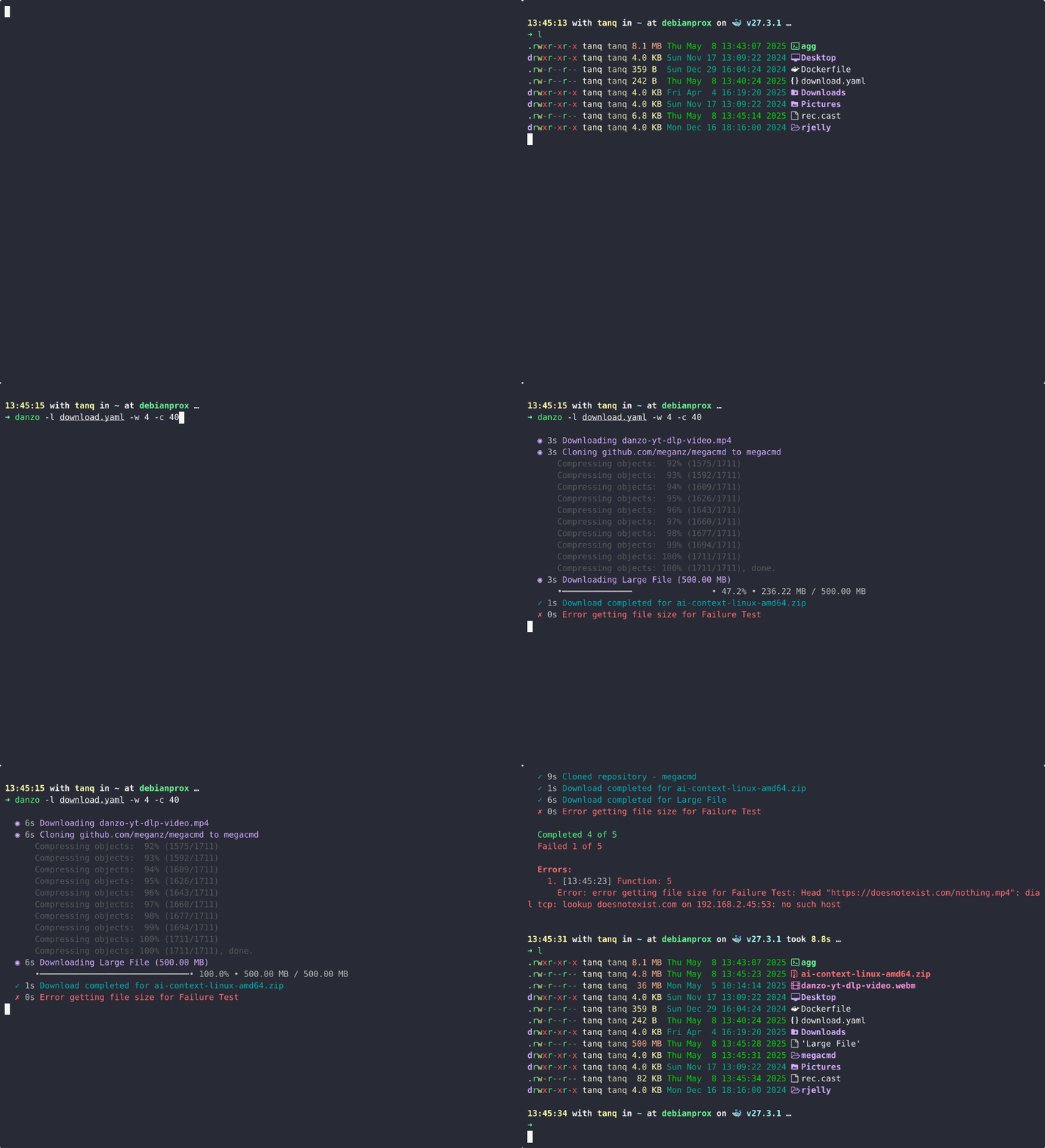
Key features visible in the example:
- Color-coded status indicators
- Concurrent operation tracking
- Stream output management
- Automatic summary reporting
- Structured table output
Fin
Building effective TUIs for CLI tools requires balancing information density with readability. The implementation I came up with provides a solid foundation for creating nice looking CLI tools.
While there are many TUI libraries available, sometimes a purpose-built solution that aligns exactly with your tool’s needs is worth the investment. This implementation continues to evolve as I discover new requirements in my CLI tool development. I exclusively use this for anbu, ai-context, and danzo.
[!TIP] The best TUIs enhance functionality without compromising the CLI nature of the tool. They should provide better organization and visibility while still allowing for scriptability and automation.
Resources
- LipGloss - Style definitions for the TUI
- Go Concurrency Patterns - Essential reading for channel patterns